

AI PLAN
Set a goal
Start with what you want to achieve. AI Plan works out the
steps,
builds the plan and gets it to your team.
WHAT YOU GET
From goal to plan.
No blank canvas
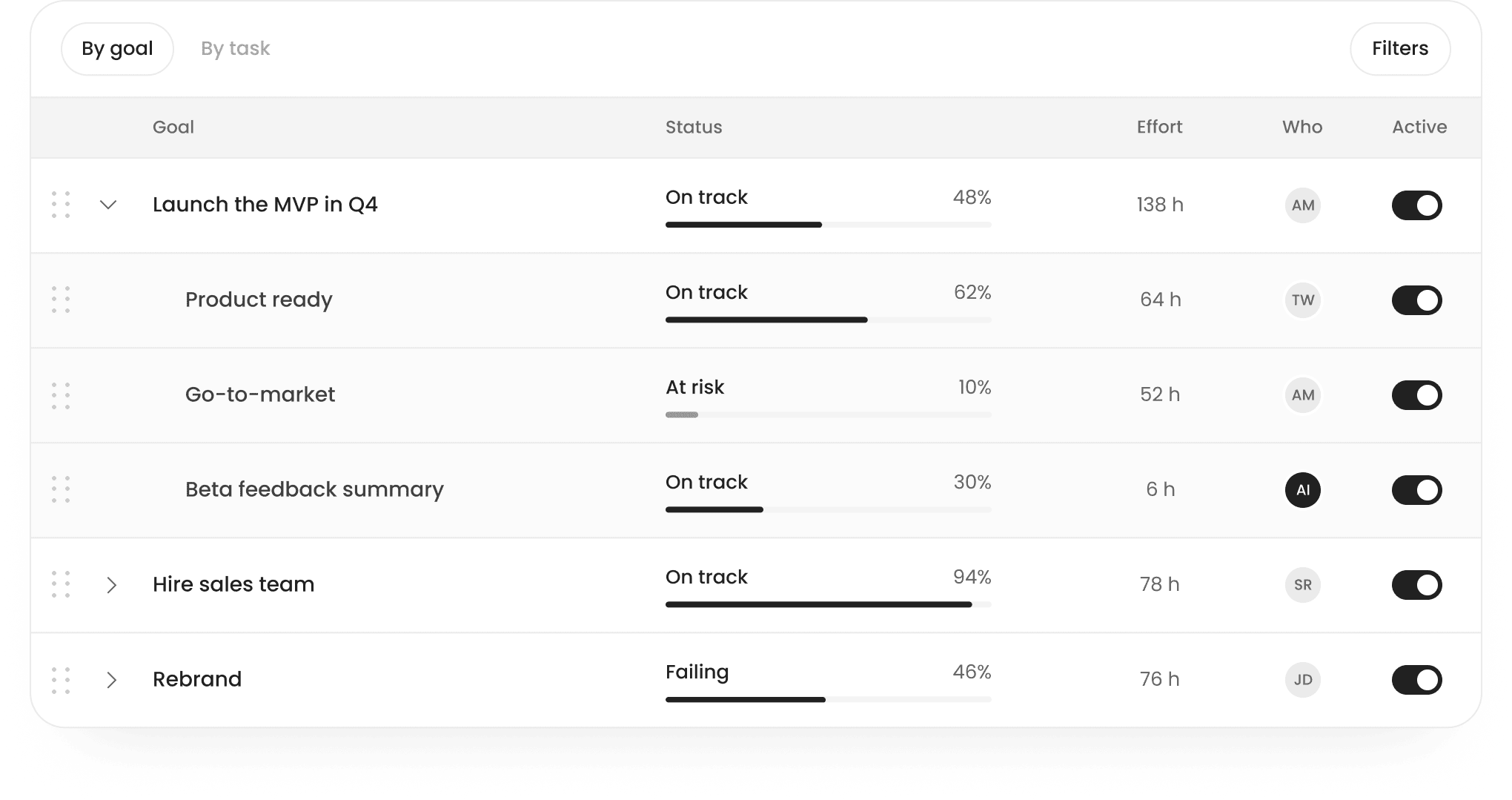
Your goal becomes a plan, automatically: sub-goals with tasks, owners, effort and progress, all in one view your team can act on.
THE SPECS
What AI Plan does
Watch a task get pulled out of a real message, then see what happens next.
Input
An outcome. Plansom works out the steps.

Refinement
The Plansom algorithm sharpens your objective, asking questions until it is SMART, with measurable KPIs.
Plan creation
An outcome. Plansom works out the steps.
Structure
Goals with tasks inside. Every goal sits under a parent goal, with no limit on depth.





Views
By goal or by task.
Owners
Assigned automatically, to teammates or agents.


Agents
Custom workflows built on Plansom, or your own LLM workflows, executing straight from the plan.
Effort
Hours on every goal and task.
Progress
Status per goal, updated as work moves, visible to the whole team.
Sharing
With your team, straight away.

How it works
From one sentence to a shared plan, then to work done.
-
01Set a goal
Say what you want to achieve.
No need to map every step.
-
02Sharpen it
Refine your objective.
A SMART objective, with measurable KPIs.
-
03Get the plan
The plan creates itself.
Sub-goals, tasks, owners and effort.
-
04Share it
Invite your team.
Everyone sees how their work fits the goal.
-
05Keep it moving
Connect your inbox.
Tasks added, work delegated, agents assigned.
AUTOMATIC
It all happens on its own
-
01Auto-added
New tasks from email, Slack and meetings land in your view.
-
02Auto-delegated
Work goes to the right teammate, with its context.
-
03Auto-assigned
AI agents take on specific tasks and execute them.
FAQs
Can Plansom create a plan for me?
Plansom is an AI work simplifier. Tell it what you want to achieve and connect the tools where work happens. Plansom creates plans for your goals, finds work in your connected tools and shows you what matters most right now. You can delegate to teammates and AI agents, then see how the work is progressing.
Will AI Plan help me write a better goal?
Yes. The Plansom algorithm sharpens your objective, asking questions until it is a SMART objective with measurable KPIs.
Can AI Plan add tasks and delegate automatically?
Yes. Once you connect Plansom to your inbox, AI Plan can add new tasks to your plan, delegate them to team members and assign AI agents to execute specific tasks.
Can I have more than one goal?
Yes. Plansom organises goals and the work beneath them, so you can see how tasks contribute to what you are trying to achieve.
Can I edit what Plansom creates?
Yes. You can review, edit, reassign or remove anything Plansom creates. You remain in control of what belongs in your plan.
How many AI Plans can I create?
The Free plan includes one AI Plan a month. Pro includes unlimited AI Plans, with a 14-day free trial and no credit card required.
Is my data used to train AI models?
Customer data is not used to train the underlying AI models.

GET STARTED
Start with a goal.
Or start from your inbox.
Create an AI plan
Tell Plansom what you want to achieve. Get a structured plan you can shape, share and act on.
Prioritise from inbox
Connect your email. See the tasks and commitments Plansom finds in your own work.